
API Authentication
Base URL
https://api.yourdomain.com
All API endpoints are prefixed with /api/. Include these headers on every request:
Authorization: Bearer YOUR_TOKEN
Content-Type: application/json
Accept: application/json
Authentication Methods
OAuth2 Token
For dashboard operations — managing payment applications, listing payments, account settings:
Authorization: Bearer YOUR_OAUTH_ACCESS_TOKEN
Client Token
For server-to-server API calls — creating payments, checking status, fetching instructions. Created in the merchant dashboard with specific permission scopes:
Authorization: Bearer YOUR_CLIENT_TOKEN
Client ID
Each payment application is assigned a unique Client ID (32-character string). The Client ID identifies which application a payment belongs to and is passed in request bodies when creating payments:
{
  "clientId": "a1b2c3d4e5f6g7h8i9j0k1l2m3n4o5p6"
}
The Client ID is public-safe but tokens are not.
Creating Client Tokens
- Log in to your merchant dashboard
- Navigate to your payment application
- Click Create API Access Token
- Enter a label and optional expiration date
- Select the permission scopes you need
- Save the token immediately — it is only shown once
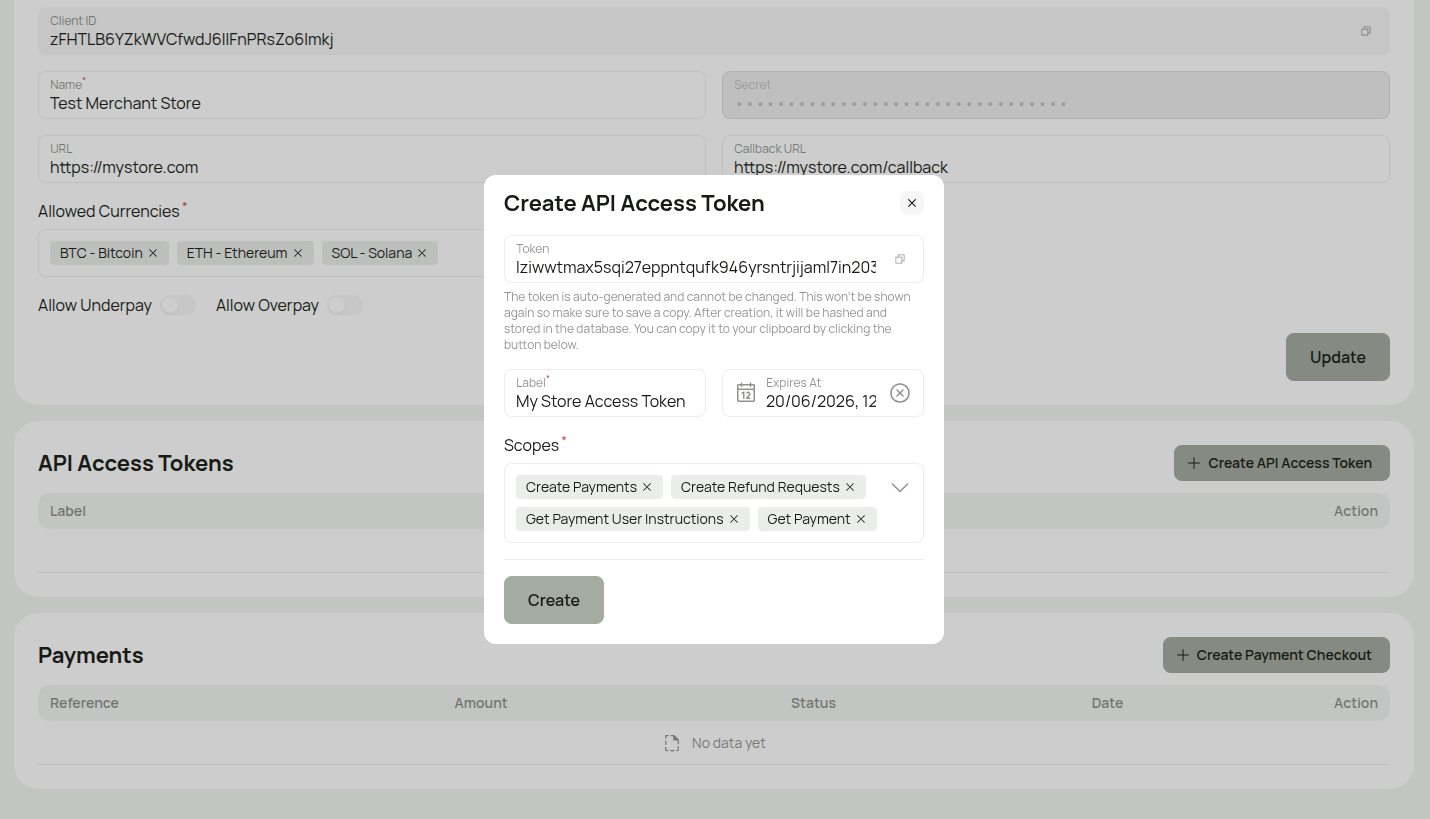
Important: The Token is auto-generated and cannot be changed. It will only be shown once — after creation, it is hashed and stored securely. Copy it to your clipboard using the copy button before closing this dialog.
Token Scopes
| Scope | Description |
|---|---|
payments.create | Create payment checkout sessions |
payments.get | Retrieve payment details |
payments.user-instructions.get | Get payment instructions for a specific provider/method |
* | Full access (all scopes) |
Example Usage
Creating a Payment (Client Token)
curl -X POST https://api.yourdomain.com/api/payment/checkout \
  -H "Authorization: Bearer YOUR_CLIENT_TOKEN" \
  -H "Content-Type: application/json" \
  -d '{
    "amount": 10000,
    "currencyCode": "USD",
    "reference": "ORDER-123",
    "referenceLabel": "Order #123",
    "clientId": "your_client_id"
  }'
Managing Applications (OAuth2)
GET /api/payment-applications
Authorization: Bearer YOUR_OAUTH_TOKEN
Environment Variables
Store your credentials securely using environment variables:
# Client ID (from your payment application)
PAYMENT_CLIENT_ID=your_32_char_client_id

# Client Token (created in dashboard)
PAYMENT_CLIENT_TOKEN=your_client_token

# Webhook Secret (set when creating the payment application)
WEBHOOK_SECRET=your_webhook_secret
Authentication Errors
| Code | Message | Solution |
|---|---|---|
| 401 | Unauthenticated | Check token is correct and not expired |
| 403 | Insufficient permissions | Token lacks required scope for this endpoint |
Security Best Practices
- Store Client Tokens in environment variables, never in source code
- Use HTTPS for all API requests
- Never expose Client Tokens in client-side (browser) code
- Use the minimum required token scopes
- Rotate tokens if you suspect they've been compromised